 UnitBasse
Effects · Noise gate
Noise gate for bass:
silencing the hiss between notes
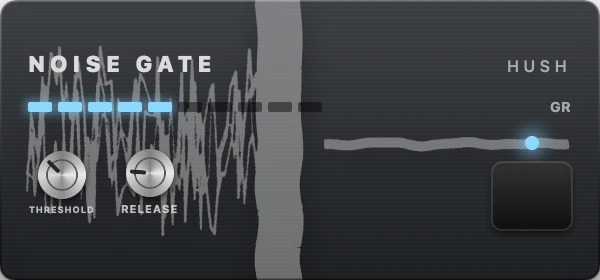
A noise gate cuts the sound when you’re not playing. It silences hiss, hum and little string noises between notes, especially with a driven tone. The trick is to set it just above the noise, without cutting off the end of your notes.
What it does to your sound
A noise gate is a doorman. It watches the signal level: as long as it stays below a threshold, it keeps the door shut and nothing comes out. As soon as a note goes over that threshold, it opens and lets the note through untouched.
When the note dies away and drops back below the threshold, the gate closes again, more or less quickly depending on its release. Too fast, and the end of the note is chopped off; more gently, and it fades out naturally.
It doesn’t remove the noise while the note is playing: it only hides it between notes, where you hear it most. It’s most useful with drive, which brings up every little noise.
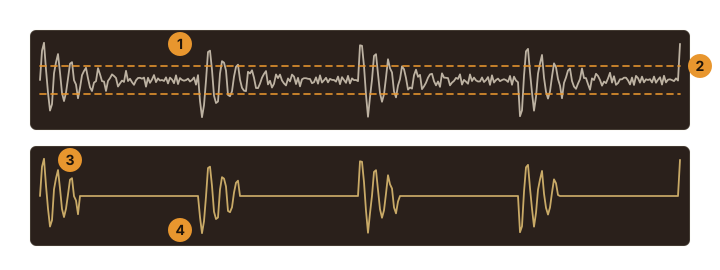
- The background noise between the notes.
- The threshold (THRESHOLD): below it, the gate closes.
- At the output, the notes get through…
- … and the noise between them is gone. RELEASE sets how quickly the gate closes.
What it’s for on bass
- Metal and driven rock: tight stops, with no hiss between riffs.
- A noisy setup: a cable, an audio interface or a bass that hums a little.
- Before drive or heavy compression, both of which bring up the noise.
The controls, one by one
THRESHOLD threshold · −60 to 0 dB in UnitBasse
The level below which it cuts. Too low, it lets the noise through; too high, it also cuts your soft notes and the end of your notes.
RELEASE release · 10 to 500 ms
How quickly it closes. Short, for tight stops in metal; longer, for a natural end to each note.
A starting point
- Set THRESHOLD all the way down and RELEASE to halfway.
- Don’t play, and raise THRESHOLD until the hiss disappears. Stop right there.
- Play a long note and let it ring out: if the end gets cut off, lower the threshold a little or lengthen RELEASE.
- Play softly: every note should get through.
For comparison: the UnitBasse factory preset Metal sets its Noise Gate to −40 dB, at the start of the chain, ahead of the Compressor and the Distortion.
The pitfalls
- Notes cut short: threshold too high or release too short. Sustained notes stop dead.
- Soft notes swallowed: a ghost note or a lightly played note no longer gets through. Lower the threshold.
- Chattering: on a note that fades out near the threshold, the gate opens and closes over and over. Lengthen RELEASE.
- A gate hiding a problem: a loud hum often comes from a cable or a ground issue. The gate masks it, but the problem is still there.
Where to put it in the chain
Right at the start, before the compressor and the drive pedals. It cuts the noise before compression brings it up and drive makes it bigger. That’s its place in the classic order: the first effect in the chain.
In UnitBasse
The noise gate is called Noise Gate, nicknamed Hush, in the Dynamics family, alongside the Compressor. Its display, Gate opening (input → output), shows the threshold below which it cuts. You’ll find it in the factory preset Metal.
Frequently asked questions
Do you need a noise gate on bass?
With a clean tone, rarely. With heavy drive or a noisy setup, it becomes useful for clean silences between notes.
Why is my noise gate cutting off my notes?
Its threshold is too high, or its release too short: the note gets cut as soon as it weakens. Lower THRESHOLD to just above the noise, and lengthen RELEASE.
Where should the noise gate go?
First, before the compressor and the drive pedals: it cuts the noise before they bring it up.