 UnitBasse
Effects · Envelope filter
The bass envelope filter:
the funk “quack”
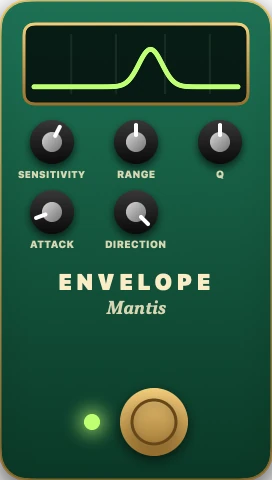
An envelope filter is a wah that reacts to your attack: the harder you pluck, the further it opens, then it closes again as the note dies away. Every note goes “bwow.” It’s the sound of funk, and it all comes down to setting how sensitive it is to your playing.
What it does to your tone
A filter lets some frequencies through and cuts others. This one boosts one specific band of frequencies, like a voice saying a vowel. When that band moves from the lows up to the highs, you hear the sound go from “oo” to “ah”: that’s the “wah.”
The envelope is the shape of a note’s volume over time: it jumps up at the attack, then falls away. The envelope filter measures that shape and uses it to move the filter. A hard attack sends it way up into the highs, a soft one barely moves it. Then, as the note dies away, it comes back down to the lows.
The result: your plucking hand drives the effect. So you have to set the pedal for your playing, and play with it.
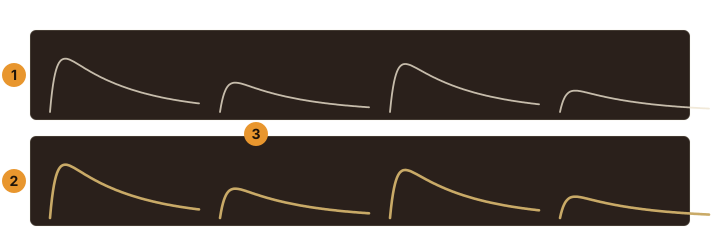
- The volume of four notes, played hard, soft, hard, soft.
- Where the filter sits: the louder the note, the higher it goes, then it comes back down as the note dies away.
- A soft note: the filter barely opens.
What it’s for on bass
- Funk: short, punchy notes that “talk,” fingerstyle or slap.
- Soul and disco, on steady eighth-note lines.
- Synth sounds: with a very sharp filter and a wide sweep, the bass sounds like an analog synth.
- Dynamic playing: since it follows your attack, it rewards controlled playing, where every note has its own weight.
Its controls, one by one
SENSITIVITY the sensitivity · 0 to 100 % in UnitBasse
How hard you have to play to open the filter. Too low, it barely moves; too high, it opens all the way on every note and sticks at the top. The right setting depends on how hard you play and on your bass’s output.
RANGE the range · 0 to 100 %
How far the filter can go. In UnitBasse, the sweep runs from 100 to 2,500 Hz: a short RANGE stays in the lows and mids, a wide RANGE climbs into the highs.
Q the resonance · 0 to 100 %
How wide the band the filter boosts is. Low, the effect is soft and round. High, the band is narrow and sharp: the “quack” turns piercing, almost synthetic.
ATTACK the attack · 1 to 100 ms
How fast the filter follows the start of the note. Short, it snaps open right away; longer, it glides open.
DIRECTION the direction · up or down
Up, your attack opens the filter toward the highs: that’s the classic sound. Down, it makes it dive toward the lows: a darker sound that “swallows” the note.
A starting setting
- Set the DIRECTION to up, the RANGE halfway, the Q halfway, the ATTACK short.
- Play an eighth-note line at your usual strength, and raise the SENSITIVITY until every note goes “bwow” without getting stuck at the top.
- Then play a soft note, then a hard one: the effect should sound clearly different. If it doesn’t, the sensitivity is too high.
- Finish with the Q and the RANGE, for color.
For comparison: the UnitBasse factory preset Funk sets its Envelope Filter to SENSITIVITY 70 %, RANGE 70 %, Q 60 % and ATTACK 10 ms, after a Compressor, on the Mirage amp.
The traps
- It sticks at the top: the sensitivity is too high for your playing, so every note opens it all the way. Turn it down.
- It hardly moves: sensitivity too low, or a bass with low output. Turn it up, or play with more attack.
- Uneven notes: since it follows how hard you play, an unevenly played line gives random “bwows.” A compressor in front evens out your attacks.
- Disappearing lows: a very sharp filter takes away some of the low end. Keep the Q moderate, or bring the lows back at the end of the chain with the EQ.
Where to put it in the chain
Early on, after the compressor, and before the drives. It needs to get your attack as it is: a drive in front of it would flatten the difference between soft and hard notes, and it wouldn’t know what to follow anymore. That’s its place in the classic order.
In UnitBasse
The envelope filter is called Envelope Filter, nicknamed Mantis, in the Filter family, along with the Wah. Its screen draws the filter response, with the frequency it’s sitting at: you see the band move with every note. You’ll find it in the factory preset Funk.
FAQ
What’s the difference between an envelope filter and a wah?
Both move the same kind of filter. A classic wah is worked with your foot; an envelope filter follows how hard you pluck. In UnitBasse, the Wah is automatic: it sweeps on its own, at a speed you set, without following your playing.
Why does my envelope filter stay open?
Its sensitivity is too high for the way you play: even your soft notes open it all the way. Lower the SENSITIVITY until soft and hard notes sound different.
Do you need a compressor with an envelope filter?
It helps a lot: more even attacks give a more even effect. Keep the compression gentle, so the filter can still hear the difference between your notes.